
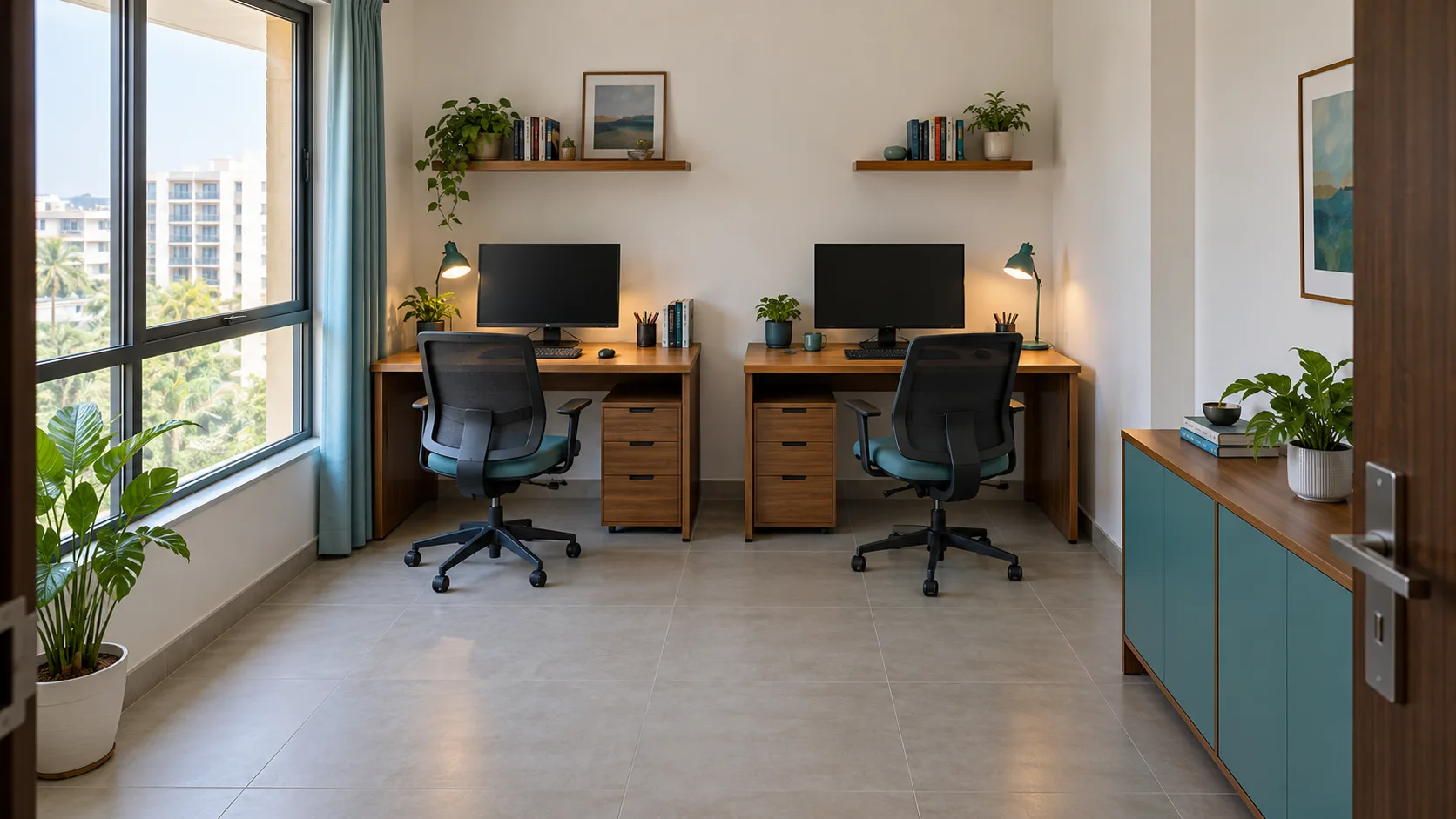
A spare bedroom can accommodate two desks without becoming a workable office for two people. One person may spend the morning on video calls while the other needs silence. A monitor can fit on a desk yet reflect the window all afternoon. A chair can slide under a table but block the doorway when someone sits down. Shared home office planning starts with these ordinary conflicts, not with buying matching furniture.
Vastu can provide a traditional frame for choosing between otherwise suitable arrangements. It should not decide whose comfort matters more or require an unusable desk position. This guide considers two adults sharing a room, including apartment residents who cannot move doors, windows or electrical outlets.
Start with two workdays, not two identical desks
Before measuring furniture, each person should describe a typical working day. Note call times, concentration periods, screen requirements, paper use and whether visitors enter the room. Include occasional activities: spreading drawings across a surface, recording a presentation or working with a second laptop. These details often explain why a visually balanced arrangement feels awkward in practice.
Make separate lists of essentials and preferences. A person who uses two monitors may need more usable desktop space; someone reviewing printed documents may value an adjustable task lamp. Equal consideration does not mean identical furniture. Agree how to allocate the window-side position, storage and any shared equipment without assuming that seniority, income or gender determines the better seat.
- Record each person's busiest call periods and quiet-work needs.
- Measure the actual equipment, including stands, docking stations and open notebooks.
- Mark the door swing, window opening, outlets and fixed storage.
- Decide whether the room must also accommodate guests or another household activity.
Where traditional Vastu fits
Many contemporary Vastu guides suggest facing north or east while working. Treat this as a traditional preference, not evidence that another direction causes poor performance. Interpretations vary, and a room's location is a different question from the direction a seated person faces. If you follow a particular tradition, identify which preference you are trying to accommodate before rearranging everything.
When two comfortable positions are available, direction can be a tie-breaker. When the preferred position puts a screen in strong glare, obstructs a door or forces someone into a narrow corner, solve the practical problem first. There is no reason to sacrifice one person's usable workspace to give the other a preferred orientation.
You also do not need two north-facing desks, matching symbolic objects or a remedy product to make a shared office legitimate. Establish a workable arrangement, then incorporate any meaningful personal practice without reducing usable desk space. For individual placement considerations, see the desk, wall and window guide.
Choose a layout around movement and tasks
Side-by-side desks along one wall
This arrangement can leave the centre of a small room open and simplify equipment placement. It works particularly well when both people mainly do quiet work and want similar backgrounds for calls. Check the full working width: elbows, notebooks and chair arms need space beyond the footprint of the monitor.
The drawback is proximity. A microphone may pick up the neighbouring voice, and one person's lamp may shine toward the other. Separate desks allow individual adjustments, while a long shared surface requires agreement about where each workspace ends. Do not assume that a decorative divider will provide acoustic privacy.
Desks on perpendicular walls
Two separate desks on adjacent walls can create more visual independence. Each person has a different view and background, which may help when both use video calls. Test the corner carefully: two chairs pulling back at once can collide even when both desktops fit neatly.
A window-side desk also needs an afternoon glare check. Blinds can make a useful difference, but a layout photograph cannot show every hour of daylight. Leave access to windows, radiators, ventilation grilles and equipment rather than filling the gap with a tall cabinet.
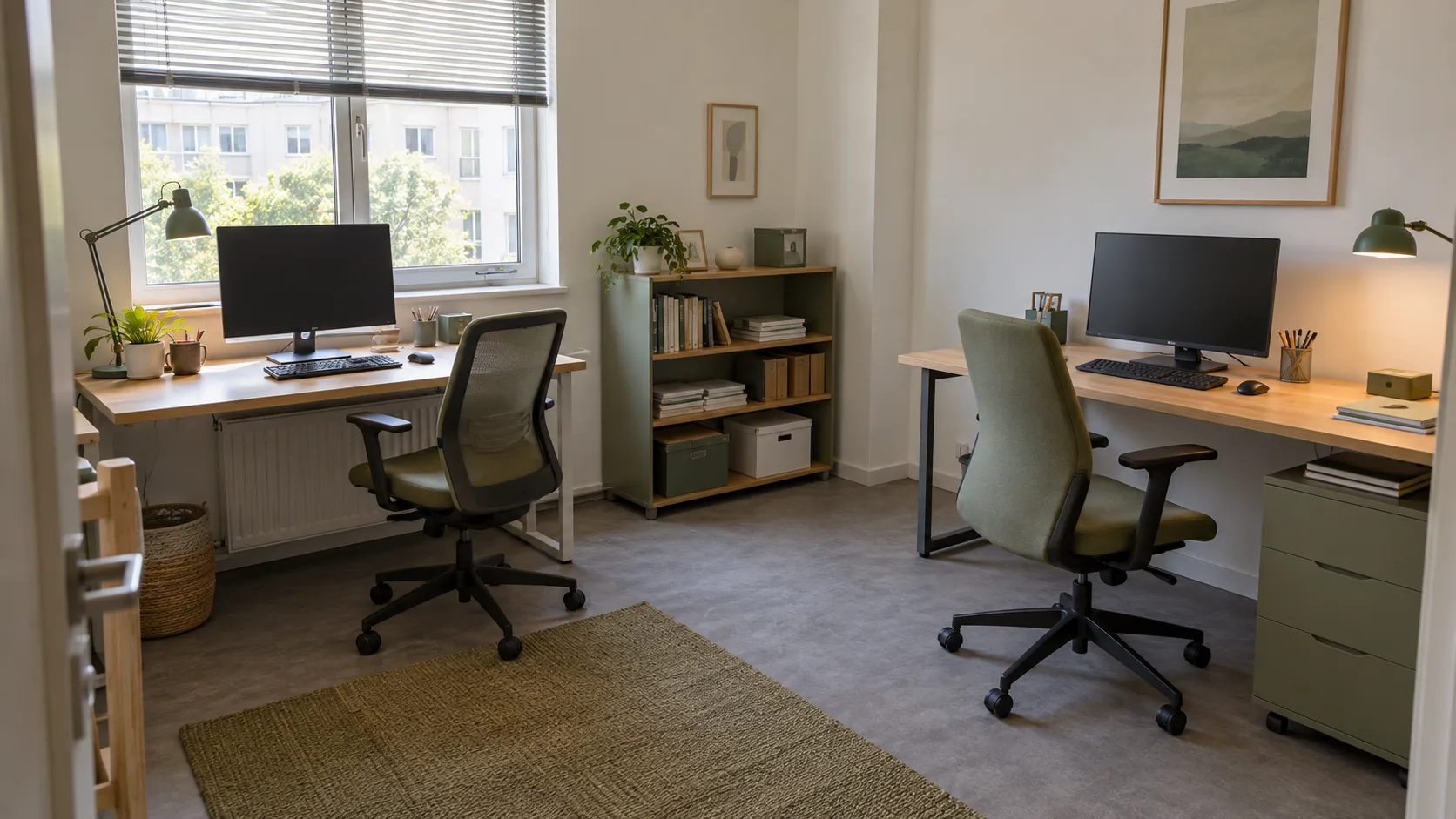
Desks against opposite walls
This can provide separate work zones and more wall storage, but the chairs share the middle route. Sit in both positions and practise standing up, walking out and opening drawers. Facing away from each other does not prevent sound carrying across a room. Choose this arrangement for its usable space, not as a promise of sound isolation.
Check daylight and each person's screen separately
A shared office may have one good window but two different glare problems. Test both monitors in the morning and afternoon using the actual screen brightness and blind setting. A bright window behind a screen can create a difficult contrast; a window behind the seated person may reflect in the display. Where feasible, try positioning screens at right angles to the window.
OSHA's workstation environment guidance recommends managing glare through workstation placement, window coverings and appropriate lighting. Apply that reasoning individually. One overhead light is not a substitute for checking both desks, and a task lamp should illuminate paperwork without shining into the neighbouring person's eyes or display.
Adjust each chair and monitor for its user rather than matching their heights for a photograph. The OSHA monitor guide discusses screen position in relation to the person and other equipment. A laptop used for long work sessions may benefit from separate input devices and an appropriate screen support, depending on the setup. Individual needs can differ.
Plan calls, concentration and privacy
Furniture placement cannot resolve two simultaneous confidential conversations. Agree on a call arrangement before committing to the room: shared calendar blocks, a separate suitable room for sensitive meetings, or different times for presentations. A headset may reduce loudspeaker disturbance, but it does not stop another person hearing your voice.
Check each camera view with the other person seated and moving normally. Avoid displaying private paperwork, family photographs or the second person's screen. Virtual backgrounds can be useful but should not be the only protection for sensitive material. Follow employer requirements for confidential work and document storage.
For everyday interruptions, agree on a simple signal and what it means. A closed laptop, written note or agreed quiet period is useful only if both people respect it. Keep an alternative for urgent questions. The goal is a practical working agreement, not a rule that makes one person feel unwelcome in a shared room.
Share equipment without sharing every surface
Give frequently used items a home within each person's own work zone. Separate trays for papers and chargers prevent a shared desk edge from becoming a permanent sorting area. Reserve a clearly identified shelf for household equipment, such as a printer, rather than storing it on whichever desk looks emptier.
Map cable routes before placing the furniture. Keep leads out of chair travel and walking paths, and allow enough slack for normal equipment adjustment. Check equipment instructions and ask a qualified electrician about insufficient or unsuitable outlets; do not improvise permanent wiring or cover cables beneath rugs to hide them.
Allow access to plugs, device ventilation and maintenance points. A printer that fits inside a cabinet may not operate properly with the doors closed. Keep drinks away from exposed equipment and give shared supplies a reachable location. These decisions are mundane, but they prevent repeated interruptions more directly than decorative additions.
When the room cannot change
Renters may have only one usable desk wall. In that case, keep the fixed constraints and adjust movable elements: monitor position, lighting, chair placement and storage. Obtain permission before drilling or altering services. A desk with a smaller footprint is useful only if it still supports the equipment and person using it.
If the office doubles as a guest room, test the bed fully open before buying desks. Identify where chairs and private documents go during a visit. A foldaway surface suits occasional work more readily than a setup that must be dismantled twice daily. Both users should know when the room will be unavailable.
Sometimes there is no good two-desk layout. An agreed schedule for using one properly equipped workstation, or a second workspace elsewhere, may be more practical than squeezing in another chair. Recognising that limit is a planning decision, not a Vastu failure.
Three illustrative shared-office examples
Example 1: Two quiet workers in a spare bedroom
One person edits reports; the other develops software. Both have occasional calls but mostly need uninterrupted screen time. They choose side-by-side desks along the longer wall, with the window to one side. Each gets an individual lamp and paper tray. They test the chair positions before ordering a shared cabinet, then place the printer near the door so neither must reach across the other's desk. Direction is considered only after these requirements work.
Example 2: A consultant and a frequent presenter
The consultant needs quiet reading time while the presenter holds several video meetings. Perpendicular desks give different camera backgrounds, but a trial reveals that both voices remain audible. Instead of buying a screen advertised as a complete solution, they agree that longer presentations happen in another suitable room. Short calls stay in the office at scheduled times. The furniture solves visual separation; the schedule addresses the actual sound conflict.
Example 3: A rented apartment with visiting relatives
Two adults share a room that contains a guest bed. They retain one permanent workstation and use a compact second desk that does not block the bed when occupied. Before a visit, one person works elsewhere by agreement; they do not expect a guest to sleep among active meetings. Work documents move into closed storage. No electrical changes or directional renovations are needed to make the arrangement clearer.
Run a one-week trial before buying more
Use existing furniture where possible and record the specific problems that recur. Note whether either person must move every time a drawer opens, whether calls overlap, and when daylight becomes uncomfortable. Review the arrangement together at the end of the week. Change one issue at a time so you know what helped.
- Can both people sit, stand and leave without moving the other's chair?
- Can windows, doors and necessary storage open normally?
- Does each screen remain usable at different times of day?
- Is there an agreed location for confidential or overlapping calls?
- Can shared equipment be reached without crossing another desk?
- Does the room still support any promised guest or household use?
Keep what works even if it differs from a styled office photograph. A successful shared home office gives two people dependable places to work and a realistic way to handle competing needs. Traditional preferences can remain part of that conversation without becoming a substitute for it.
Frequently asked questions
Do both people need to face north or east?
No. Those are common traditional preferences, not requirements for a usable office. If both preferred orientations fit comfortably, you can choose them. Otherwise prioritise each person's screen, chair, movement and work requirements. Different desk directions do not establish that the shared arrangement is harmful.
Should two desks face each other?
They can, if there is enough usable space and both people like the arrangement. Check monitor backs, cables, lighting and camera views. Face-to-face desks may increase visual distraction and do not provide privacy for calls. Test the arrangement during actual work before buying a large shared table.
Can a shelf between desks stop meeting noise?
A shelf can interrupt sight lines and organise supplies, but it is not reliable sound isolation. Ordinary conversation may still be audible around it. Plan overlapping meetings separately, particularly where work is confidential. Do not block light, ventilation or movement to create a divider that cannot solve the noise problem.
How should we decide who gets the window-side desk?
Compare actual needs such as paperwork, equipment and glare, then agree on a fair arrangement. The brighter position is not automatically better for a screen. Try both seats if helpful. A decision based on comfort and tasks is more useful than assigning the preferred place by status or income.
What if only one desk fits comfortably?
Do not force a second workstation into the exit route or a space where the chair cannot move. Consider alternating use, setting up a second suitable workspace elsewhere, or changing a storage item. A shared schedule only works when both people's work hours and equipment needs can realistically be accommodated.
Does a shared home office need a Vastu remedy?
Not simply because two people use it or face different directions. Identify the actual issue first: glare, interruptions, cramped movement or lack of privacy. Address that issue directly. Symbolic objects are optional personal choices and should not replace suitable equipment, professional installation advice or a workable agreement.
Educational only. Traditional Vastu preferences are not guarantees of health, prosperity or family harmony. Building alterations require appropriate professional advice.